
Evotix 360 Release v2026.2
Make everyday EHS&S work easier and more reliable
Discover what’s new in Evotix 360 v2026.2 and Roam 7.2.
This release brings practical AI into everyday EHS workflows, introduces stronger tools for managing control of work, audits and sustainability reporting, and makes it easier for frontline teams and administrators to keep work moving. Together, these improvements help your teams spend less time navigating administrative work and more time acting on what matters.
What’s new in v2026.2 and Roam 7.2?
- Expanding AI capabilities, built into everyday EHS work
- An easier, faster experience for frontline teams
- Easier to configure, administer and integrate at scale
- Better data quality with less manual chasing
- Stronger, more scalable sustainability & emissions reporting
- Manage critical programs with greater consistency
- Control of Work
- Audit Program
- Industrial Hygiene
Highlights
With v2026.2, Evotix 360 introduces new AI–assisted experiences designed to make reporting easier, improve the quality of information captured and help EHS managers focus their attention. Your people remain in control of the information and decisions throughout.
Make reporting easier for frontline teams
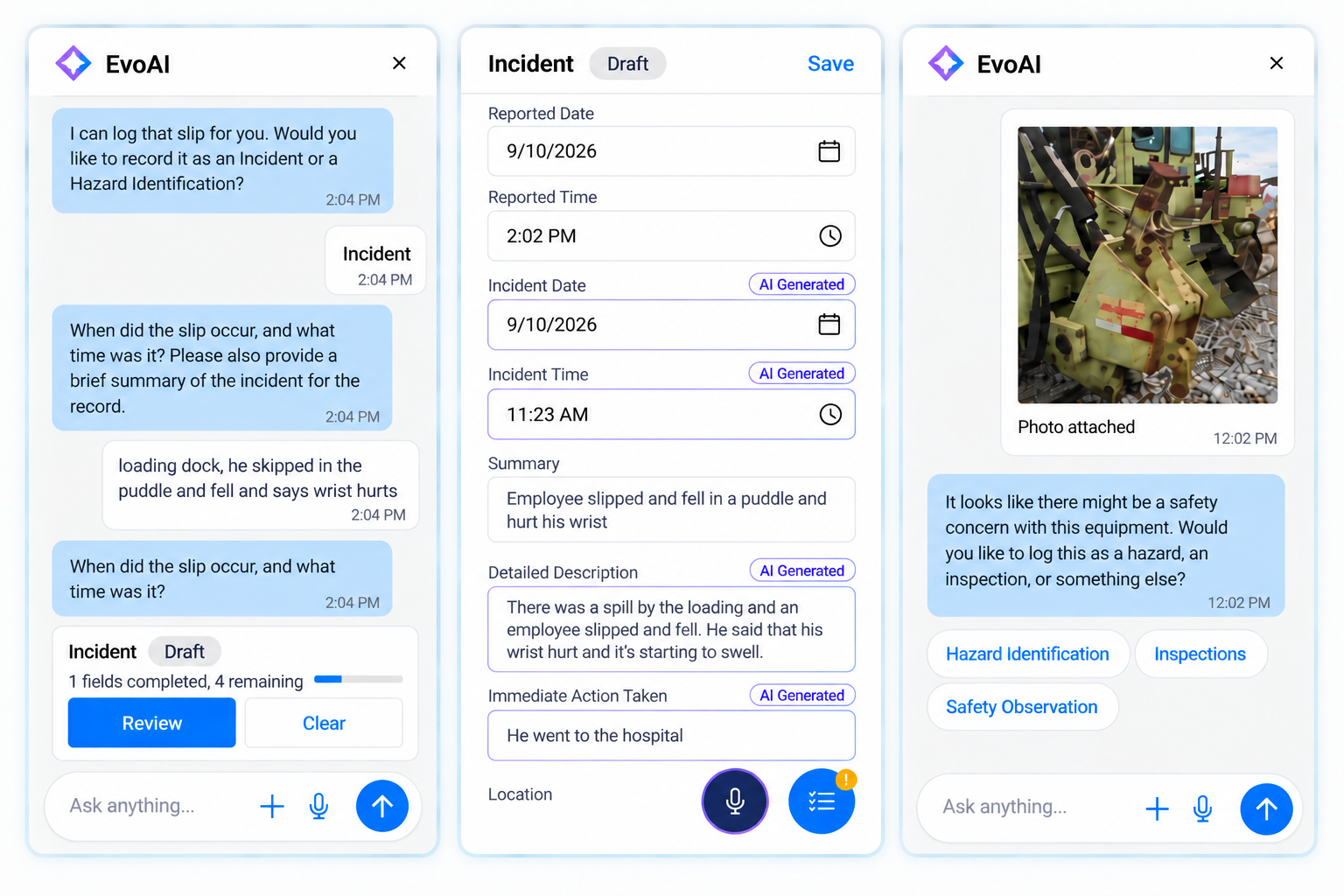
EvoAI for Record Creation asks follow-up questions to gather any missing information needed to complete the report.
- EvoAI Voice to Form lets workers start a record using natural speech
- EvoAI Image to Form extracts information from uploaded photos to begin record creation
Easier record search, using voice or text
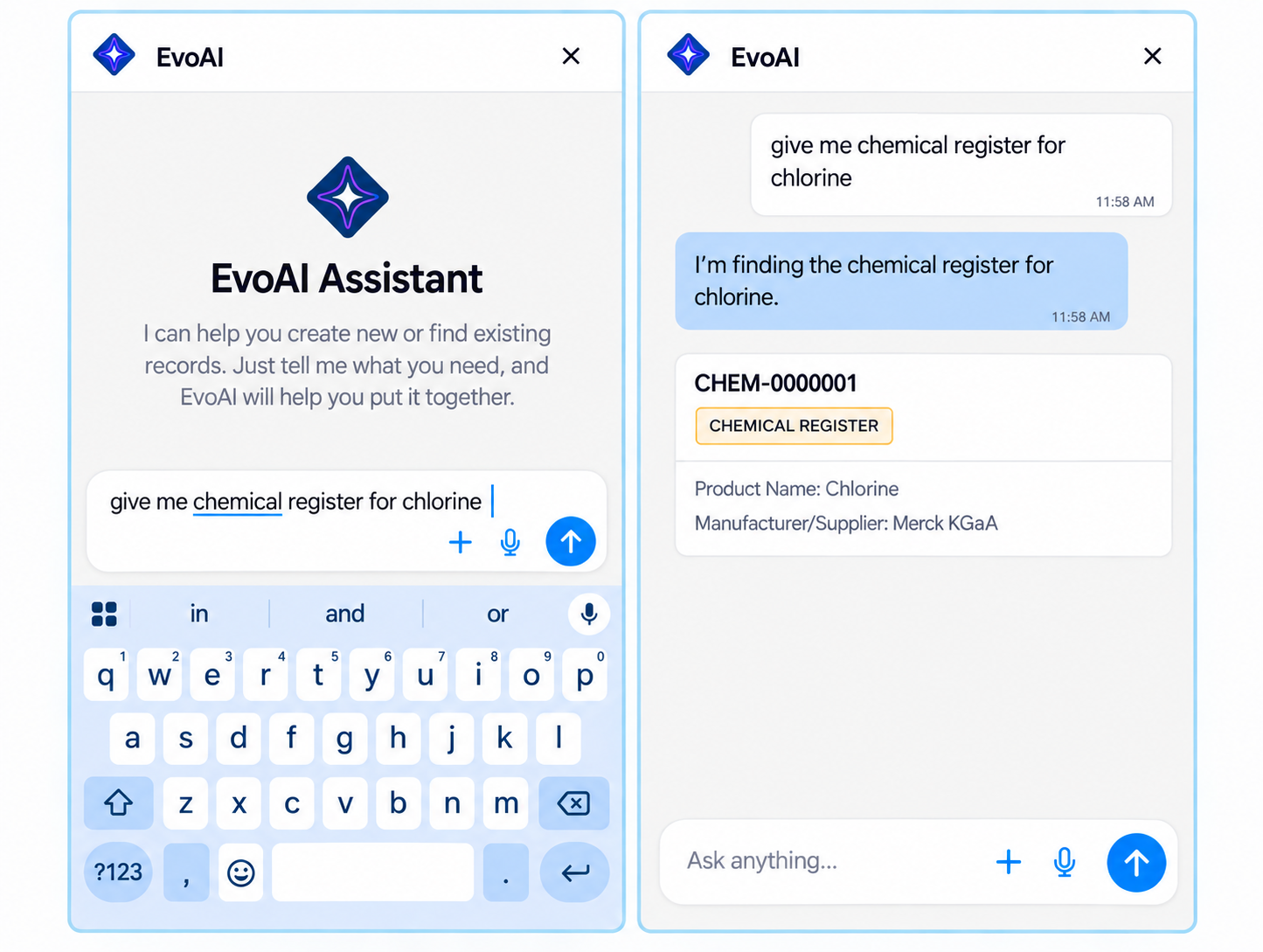
- EvoAI Interactive Search lets users find records using natural-language voice or text queries.
Improve record quality as information is entered
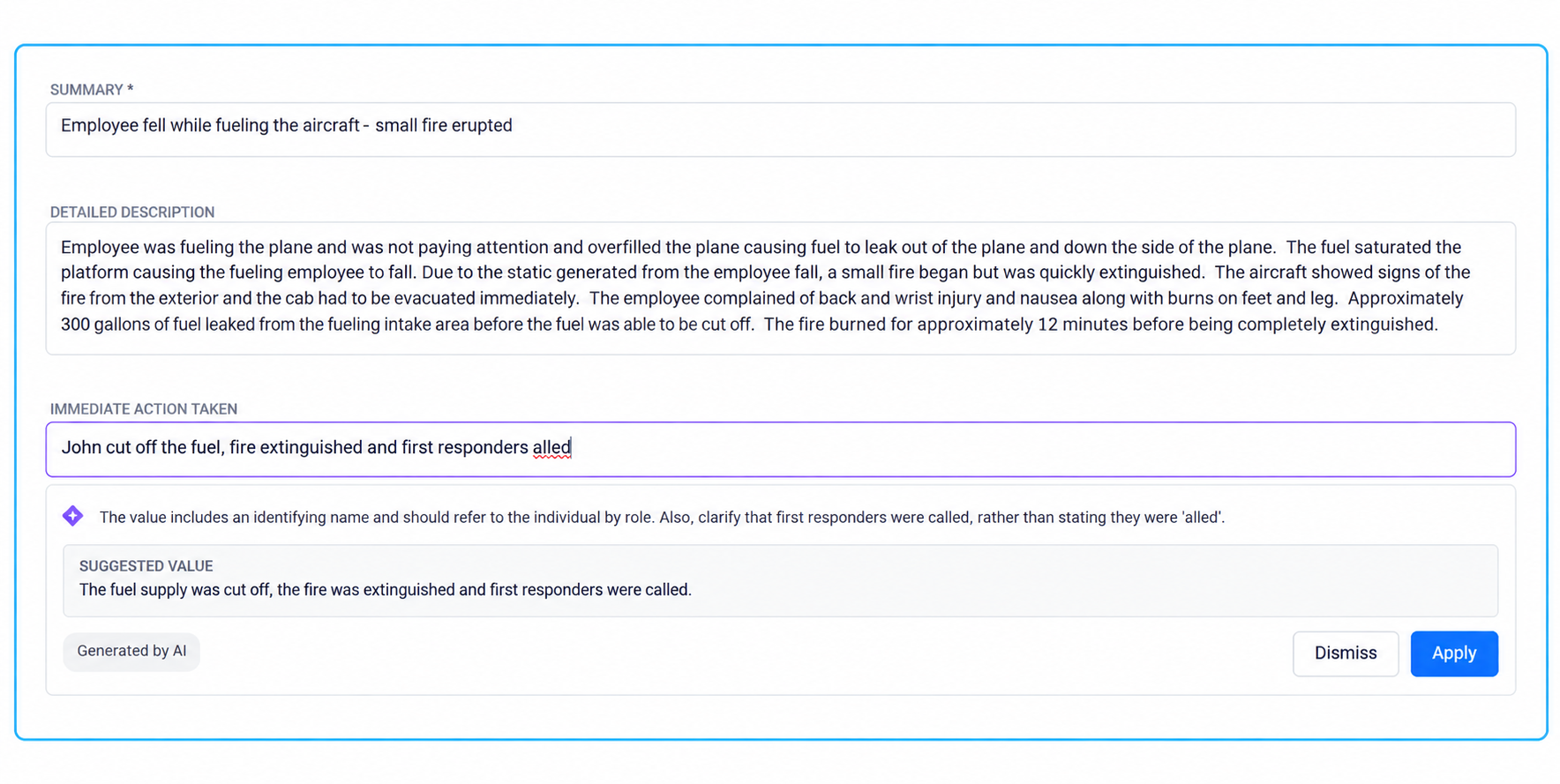
- EvoAI Data Quality Guidance provides suggestions and guidance to help improve data quality at the point of capture.
Start each day with clearer priorities
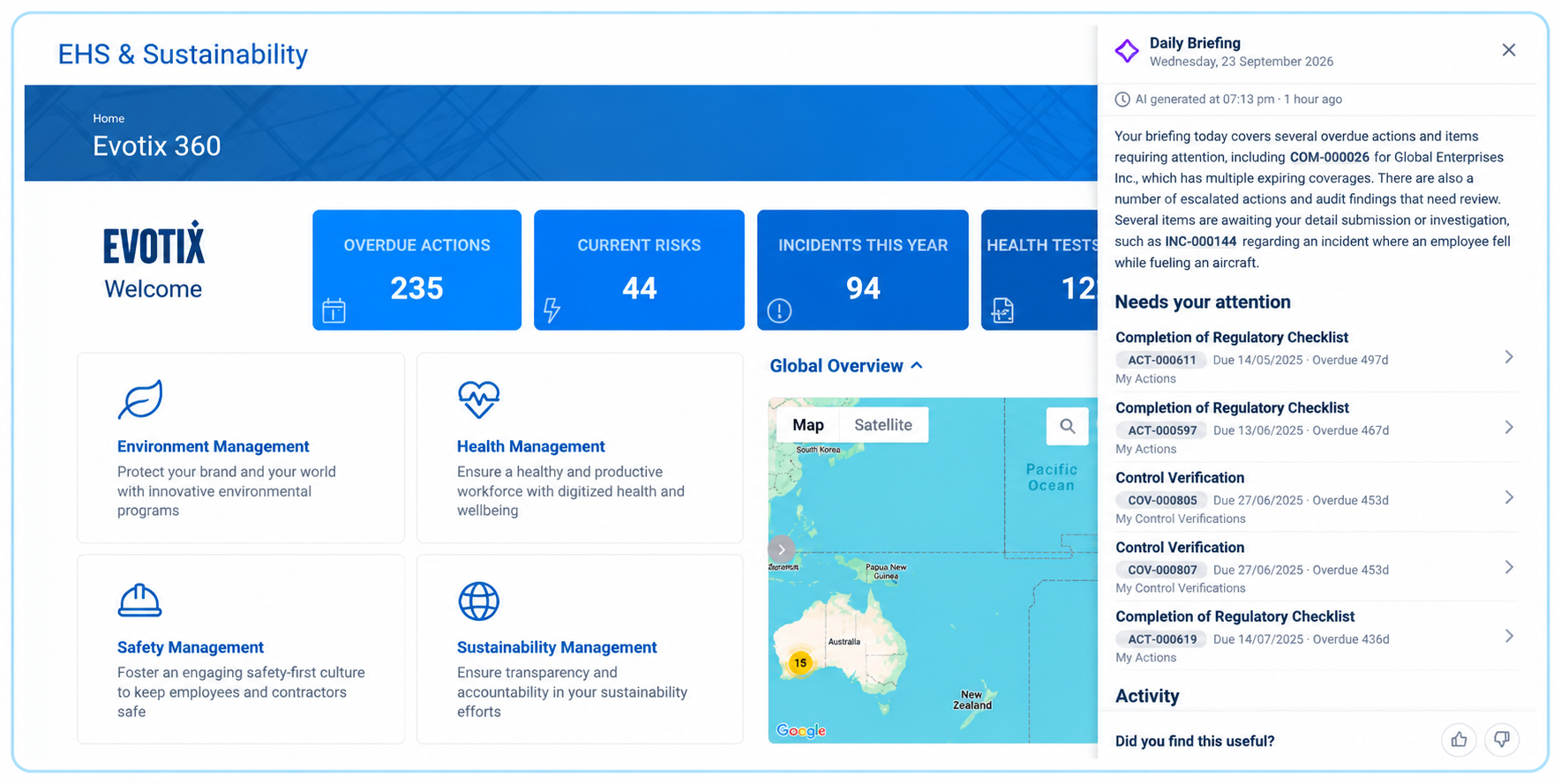
- EvoAI Daily Briefing delivers a concise, easy-to-consume summary of user activity, highlighting key updates and items that require attention
- A personalized briefing is automatically generated for each user upon login.Interactive linking cards provide direct record links, enabling users to quickly navigate and act.
Availability note: Please contact your Customer Success Manager for guidance and next steps to enable AI capabilities.
2. An easier, faster experience for frontline teams
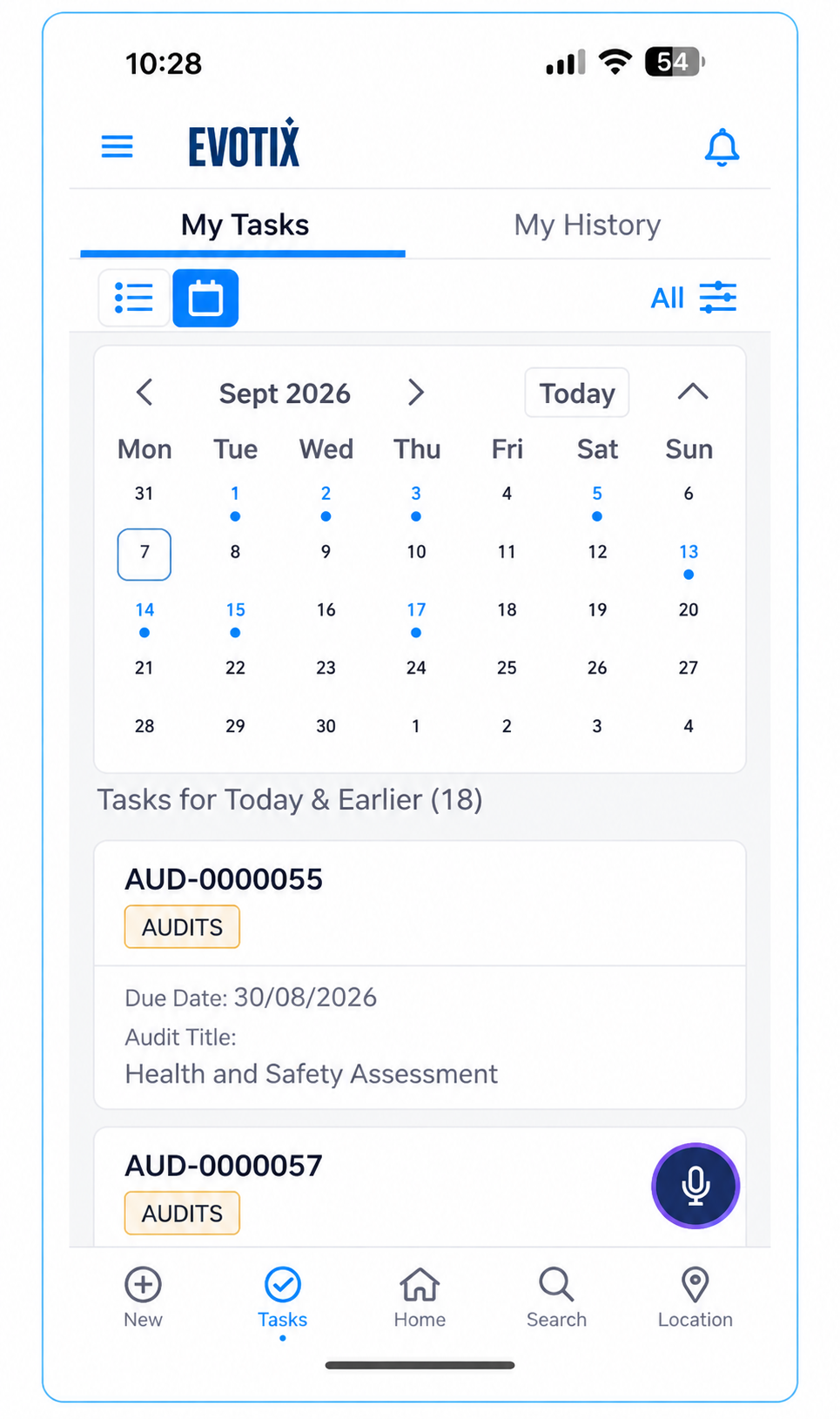
See your work laid out by day, week or month
- A new Roam calendar view shows assigned work in day, week or month calendar layouts
A more consistent and easy to use Roam experience
- UI enhancements improve form readability in the field and create a more consistent user experience.
3. Better data quality with less manual effort
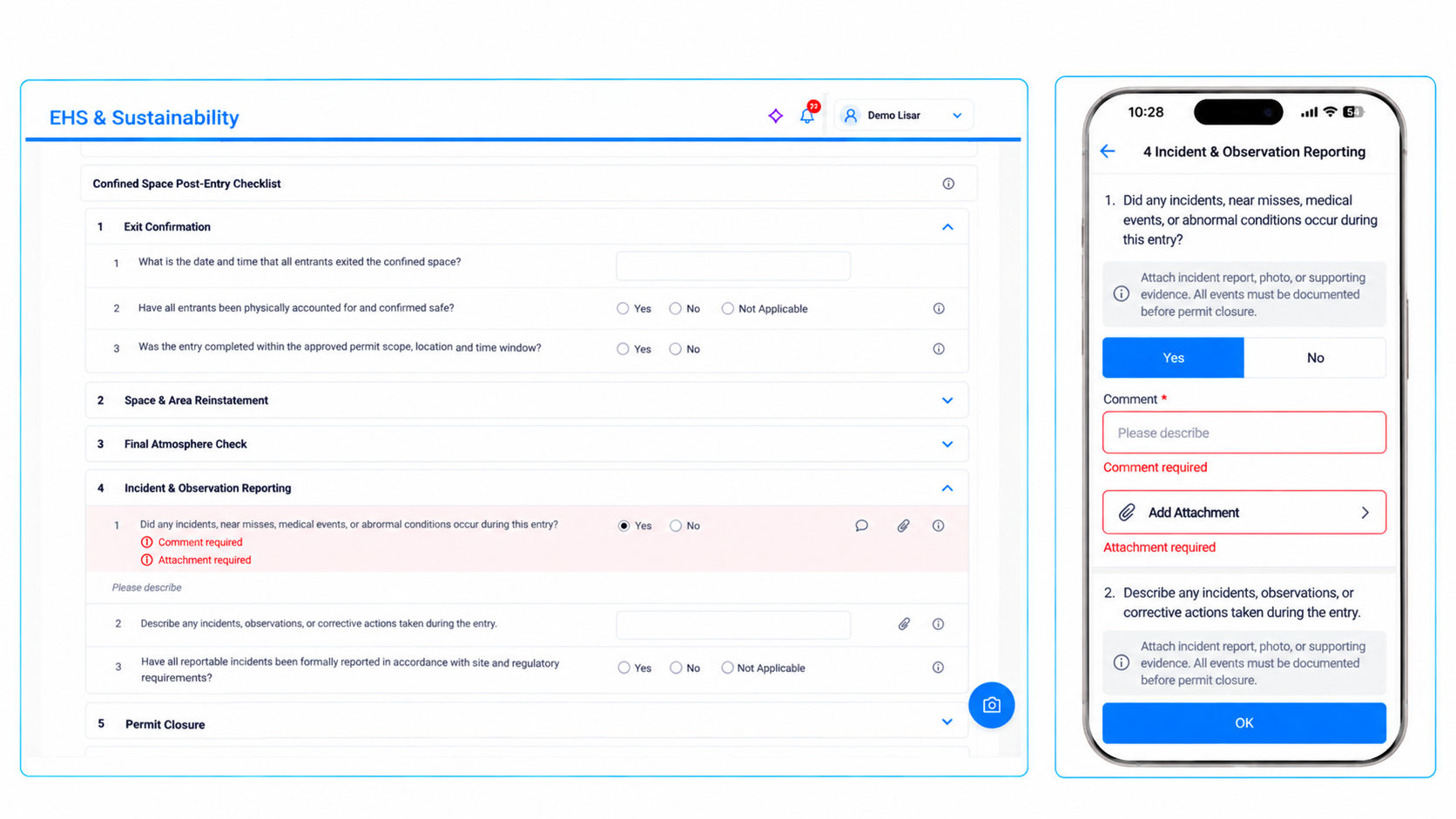
More complete questionnaire submissions
- Administrators can configure questionnaires to require attachments, comments, and/or related records before users can submit their responses.
- This validation helps improve data quality and improves process efficiency.
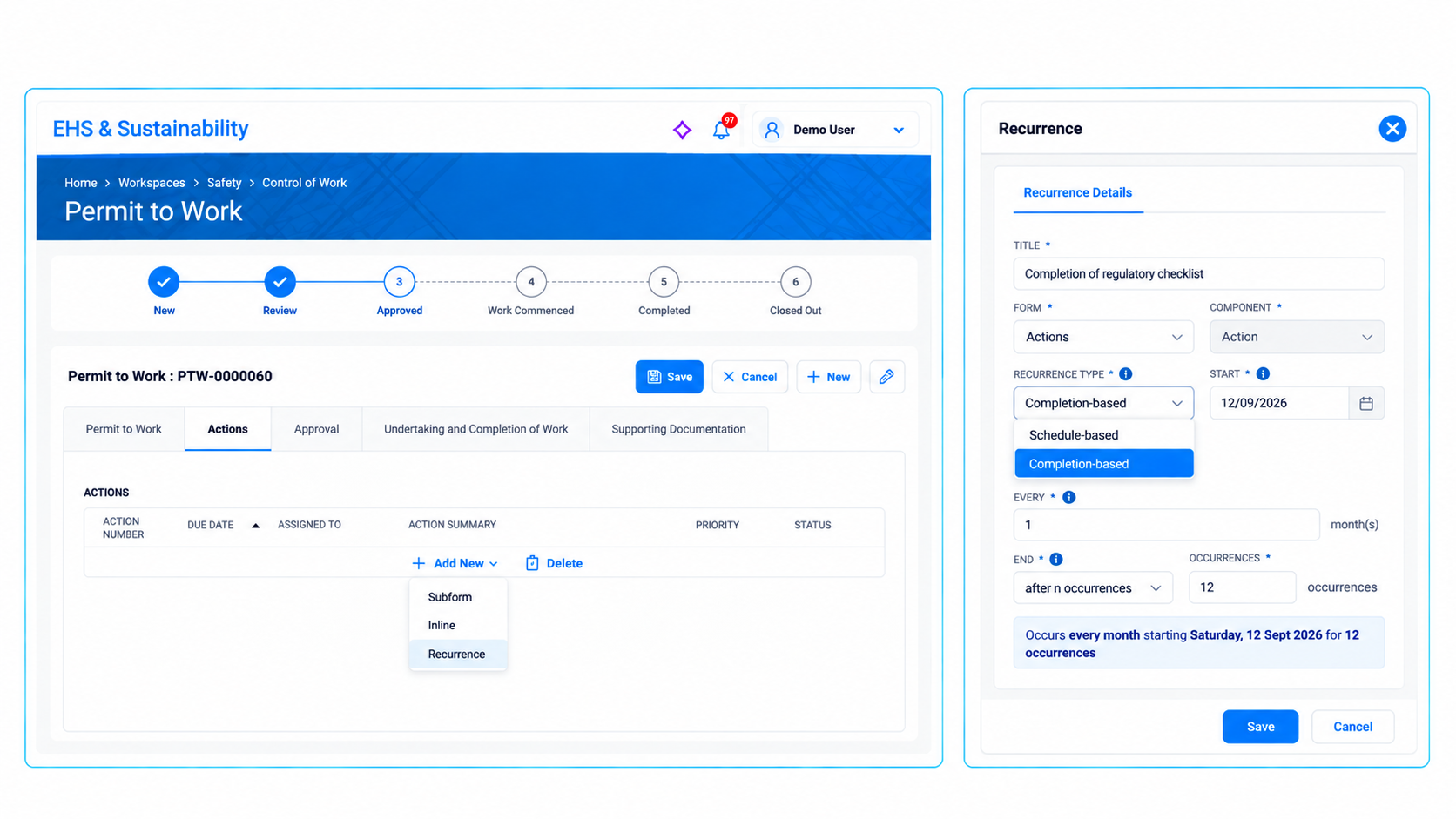
Automate recurring work more naturally
- Setup recurring tasks directly from forms and subforms, enabling a more seamless workflow and minimizing context switching.
- Support completion–based recurrence, allowing the next occurrence to be generated when the current task is completed, not just based on fixed-date schedules.
Good to know
Setting up form–based recurrence involves some configuration, and existing automated rules for recurrence will be replaced as the new capability is enabled – your Evotix team can help you plan the switch.
4. Easier to configure, administer and integrate at scale
Configure forms fields in a single workflow
- Configure common field types directly within Form Designer, reducing the need to switch between Form Designer and Component Management.
Translation changes without the downtime
- Publish updated labels, menus, dashboards and list views without requiring system downtime
More dependable enterprise integrations
- Support server–driven pagination within the REST API
- Apply configurable rate and concurrency limits across APIs
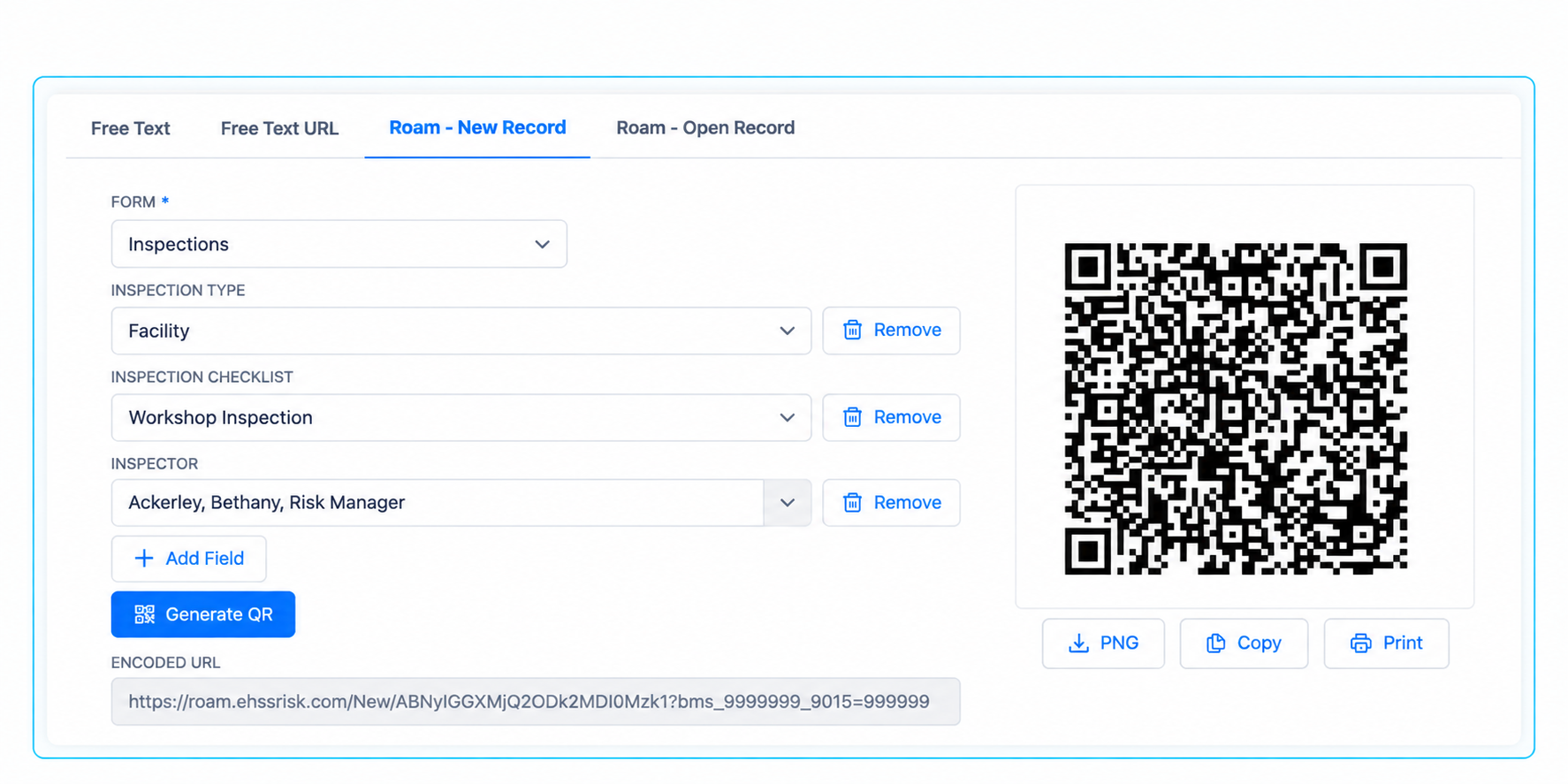
Create QR codes within Evotix 360 with the new QR Code Generator
Generate QR codes directly within the Evotix 360 for a variety of use cases, including:
- Free text fields
- URLs, including support for Passthrough Login
- Creating records in Roam using an intuitive URL builder that allows you to add fields and set default values
- Opening existing records in Roam by specifying a record ID
5. Stronger, more scalable sustainability & emissions reporting
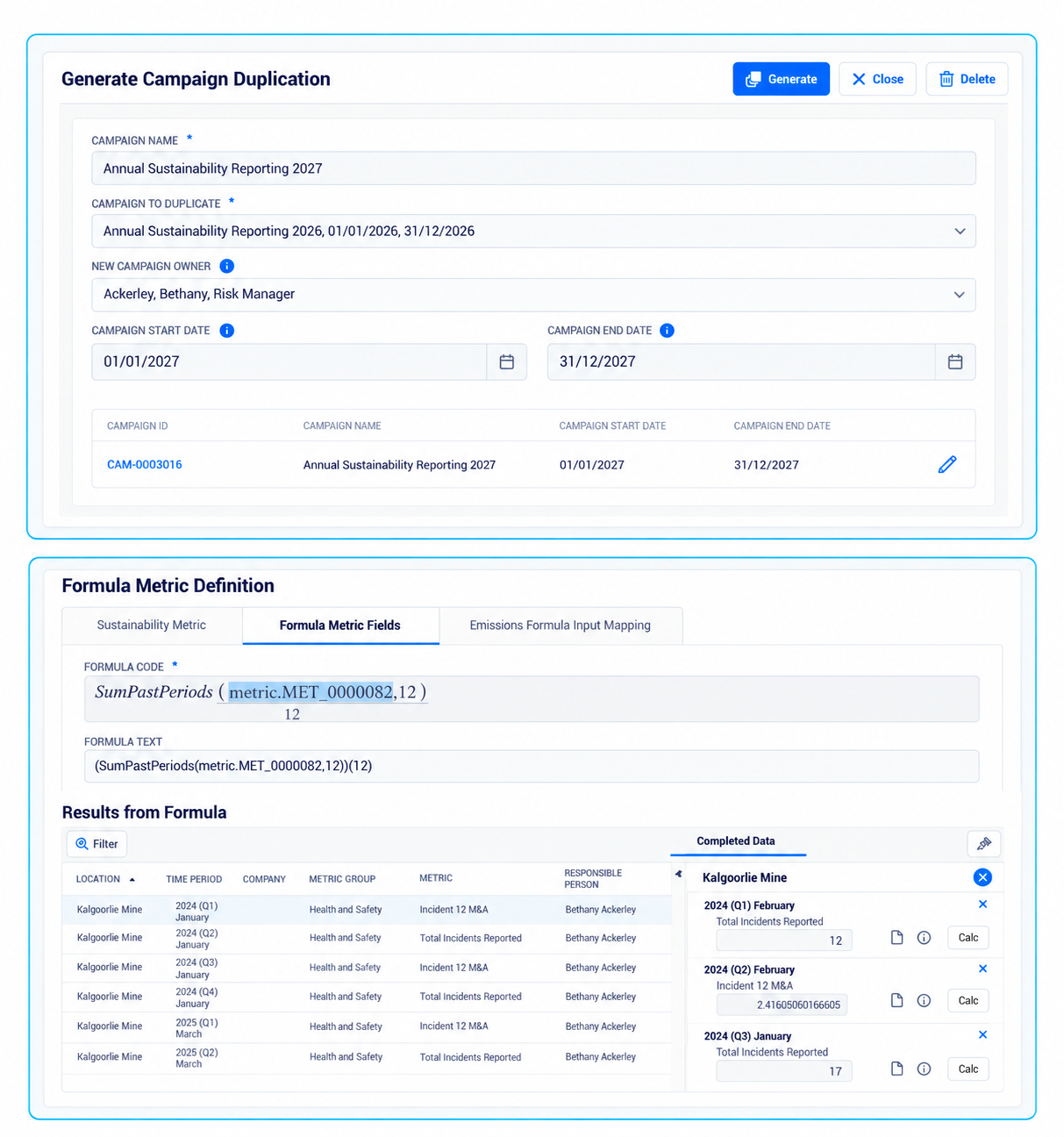
Faster, more capable Metrics & Emissions at scale
- Enhanced scalability for Metrics and Emissions Management through a re-architected framework delivering significant performance improvements to manage large volumes of Metrics data.
- Specialized Campaign Duplication streamlines creation of new campaigns reducing setup time and administrative effort
- Formula Metrics Enhancements now support advanced calculations, including 12-Month Moving Average (12 MMA) and Frequency Rate (FR) calculations, providing greater flexibility for reporting and analysis
- Expanded Metric Results Data Capture allows Campaign details, Reviewer and Responsible Person information to be recorded directly within the Metric Results record on save. This improves reporting and analysis capabilities while enabling more granular security and access control.
Accurate emissions data, with less to maintain yourself
- Integrate with the Climatiq and access the emissions factors directly within the Emissions workflows.
- Select the relevant emissions factors and link to Materials or Activities without leaving the platform.
6. Manage critical programs with greater consistency
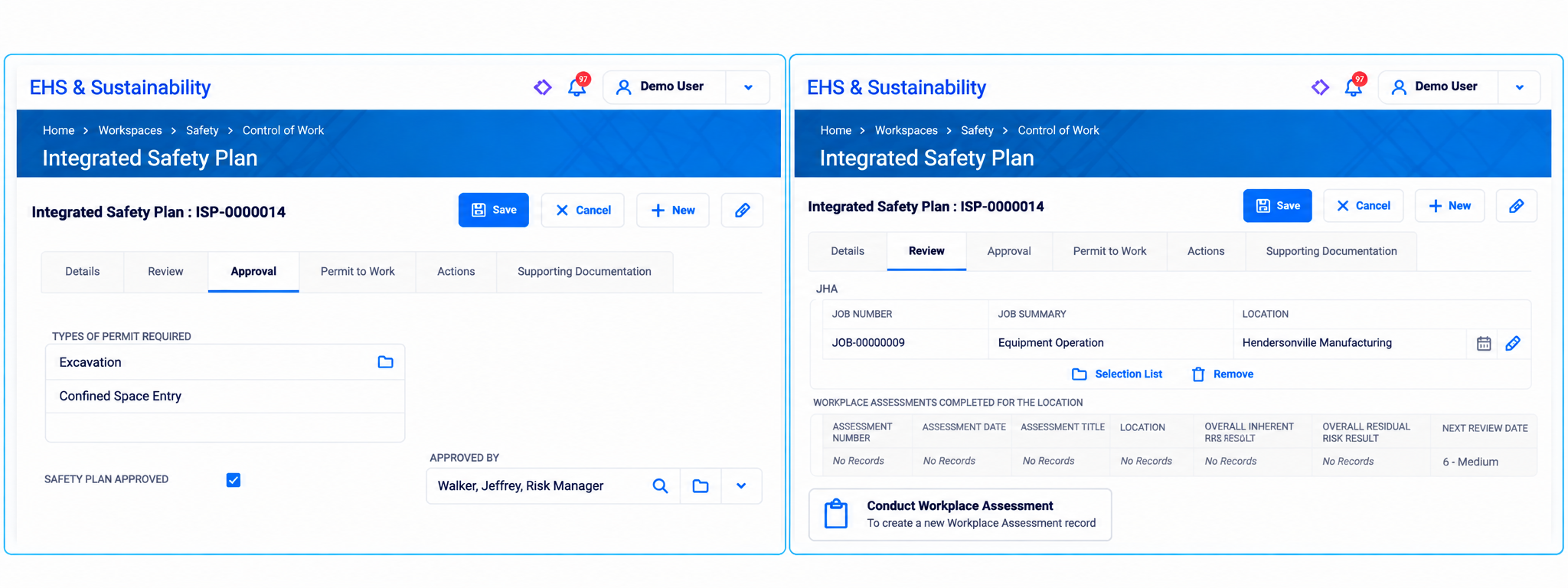
Integrated Control of Work module
- New Integrated Safety Plan connects multiple permits, JHAs, and workplace risk assessments into a single connected record. Manage permit–to–work, lockout/tagout and competency requirements in a connected workflow
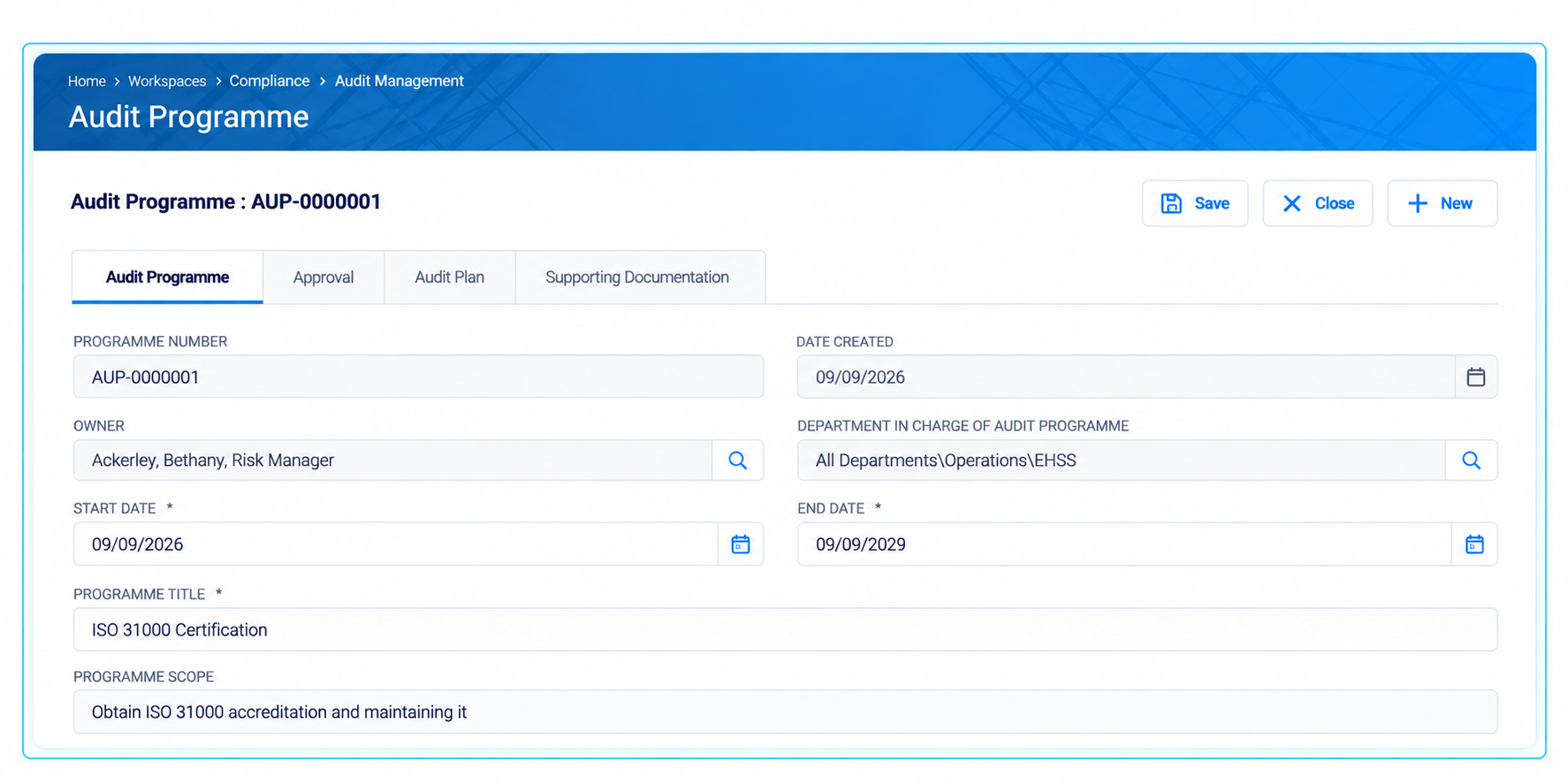
Run coordinated audit programs with less administration
- Manage multiple audits, locations and audit types as part of one coordinated audit program
- Configure more individual audit recurrence using Audit Plans.
Support more effective industrial hygiene workflows
- Enhanced workflows and result calculations
- Improve management of Similar Exposure Groups (SEGs)
Availability note: Customers already using these modules will require configuration to implement these new improvements. Please get in touch with your Evotix Representative for more details.
How to Upgrade
Every release includes a range of platform, end–user and administrator enhancements. We strongly recommend an upgrade to gain the benefits of these improvements and leverage any security improvements for improved protection.
Before you upgrade, here are some things to consider to ensure you succeed:
- Learn more about the latest version:
Understand the changes and how users will use them. Our customer webinar is an excellent start as it highlights the improvements. Second, consider tailored demos to focus on specific areas of interest and do deeper dives.
- Plan the upgrade:
Talk to Evotix’s team and plan the upgrade when your key resources are ready and at a time that suits you. Discuss using the improvements when planning your upgrade.
- Communicate end-user changes:
Understand the changes and support end users by communicating these changes. Evotix can assist with training users as part of an upgrade.
If you are a hosted customer, one upgrade a year is included to ensure you stay on the latest supported version. Reach out to your Customer Success Manager to learn more.
See Evotix 360 v2026.2 in action
Join our release webinar to see the new capabilities in action and understand how they can support your organization.